





Google Chrome Gets ‘AI Skills’ to Automate Tasks
2 min read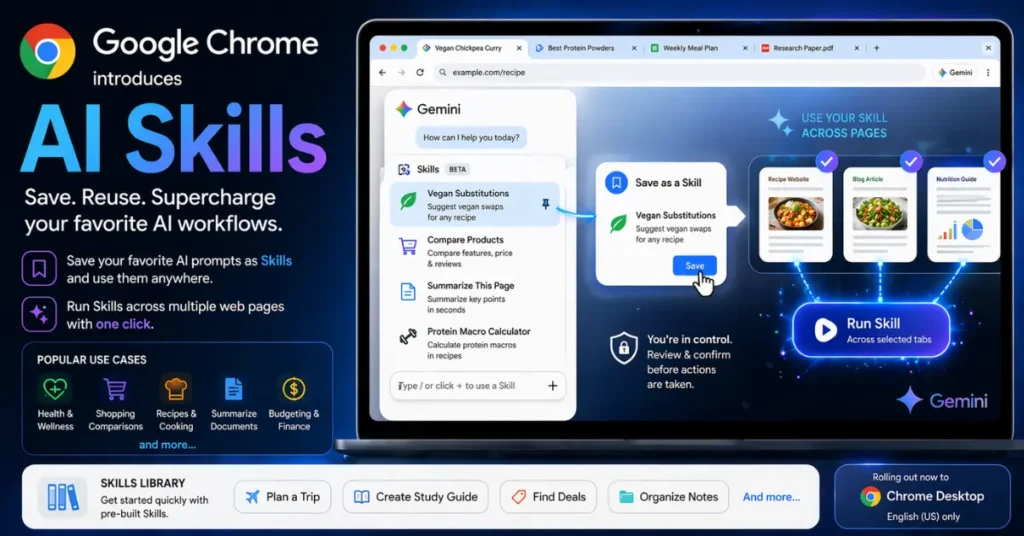
Google is bringing a fresh wave of AI features to its Chrome browser, aiming to make everyday browsing faster and smarter. The company has introduced a new feature called “Skills,” designed to help users save and reuse their favorite AI prompts across different websites.
Instead of typing the same instructions again and again, Chrome users will now be able to store prompts and run them instantly with just a click. The feature builds on Google’s growing integration of its Gemini AI into Chrome, as competition heats up with AI-powered browsers from companies like OpenAI, Perplexity, and The Browser Company.
Gemini already allows users to interact with web pages—whether it’s summarizing content, answering questions, or performing simple tasks. With Skills, Google is taking things a step further by turning those one-time prompts into reusable workflows.
For example, if you often ask Gemini to suggest vegan alternatives while browsing recipes, you can now save that prompt as a Skill. The next time you visit a recipe page, you can apply it instantly without retyping anything.
Using Skills is straightforward. Users can save prompts directly from their chat history and access them later by typing a forward slash ( / ) or clicking the plus ( + ) button in Gemini within Chrome. Once activated, the Skill runs on the current web page—and even across multiple selected tabs.
Google also allows users to edit these Skills anytime, making it easy to refine or customize prompts based on changing needs.
Early testing shows that users are already finding practical uses for the feature. Popular use cases include health and wellness tasks like calculating protein intake from recipes, comparing products while shopping online, and summarizing long documents quickly.
To make onboarding easier, Google is launching a built-in Skills library. This library will include ready-made workflows for common tasks such as productivity, budgeting, shopping, and cooking. Users can add these pre-built Skills to their collection and tweak them as needed.
As with other AI-powered features in Chrome, Google has included safety checks. Skills will ask for user confirmation before taking certain actions, such as sending emails or adding events to a calendar.
The rollout of Skills begins today for Chrome desktop users who are signed into their Google accounts. For now, the feature will only be available when the browser language is set to English (US).
With this update, Google is clearly pushing Chrome beyond a traditional browser—turning it into a more intelligent, task-driven workspace powered by AI.
Also read : Allbirds Sells Shoe Business, Rebrands as AI Firm